Variables, Data Types, Type Casting, Operators, Input and Output
Beginner-Friendly B.Pharm Notes, Worked Examples and Practice Questions
| Recommended learning order Variables → Data types → Input/output → Type casting → Operators → Integrated problems |
| Educational note: All medicine, laboratory and quality-control values are simulated for programming practice. They are not clinical instructions or official product specifications. |
Learning Outcomes
- Define a variable and create meaningful variable names.
- Distinguish integers, floats, strings, and booleans.
- Use type() to inspect a value’s data type.
- Accept keyboard input with input() and display results with print().
- Convert values using int(), float(), str(), and careful Boolean conversion.
- Use arithmetic, comparison, and logical operators correctly.
- Combine input, variables, casting, operators, and output in a small program.
Topics Covered
| Part | Topic | Main question answered |
| 1 | Variables and data types | What value is stored, and what kind of value is it? |
| 2 | Input and output | How does a user give data, and how does Python show a result? |
| 3 | Type casting | How do we convert text into a usable number or another type? |
| 4 | Operators | How do we calculate, compare and combine conditions? |
| 5 | Worked examples | How are the ideas used together in pharmacy-themed tasks? |
The Basic Python Data Workflow
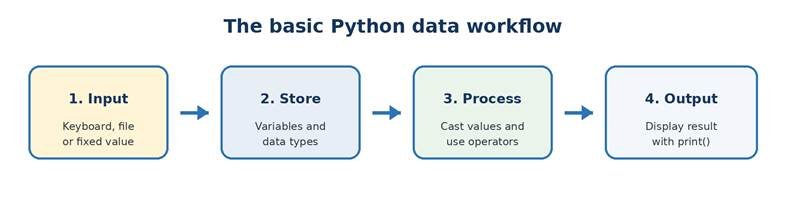
Most beginner programs follow the same pattern: obtain data, store it in variables, process it, and display the result. Keeping this four-step pattern in mind makes new programs easier to plan.
1. Variables
Definition: A variable is a named storage location that refers to a value in a program. In Python, we create a variable by writing a name, the assignment operator (=), and a value.
Basic syntax
| medicine_name = “Paracetamol” stock_units = 120 |
Why variables are used: Values become easier to remember, reuse, update and calculate. A meaningful name such as stock_units is clearer than repeatedly writing 120.
Real-life use: Variables can represent a batch number, medicine name, stock count, laboratory reading, temperature, price or whether a package seal is intact.
1.1 Variable Naming Rules
- A name may contain letters, digits, and the underscore (_).
- A name cannot start with a digit.
- Spaces and symbols such as -, @ and % are not allowed.
- Python is case-sensitive: stock, Stock, and STOCK are different names.
- Do not use Python keywords such as True, False, and, or, not and class.
- Use snake_case for readable names: batch_number, tablet_weight_mg.
- Include units when useful: volume_ml is safer and clearer than volume.
| Variable name | Valid? | Reason |
| batch_number | Yes | Uses letters and underscore. |
| tablet_weight_mg | Yes | Meaning and unit are clear. |
| 2nd_batch | No | Starts with a digit. |
| medicine name | No | Contains a space. |
| class | No | class is a Python keyword. |
| Stock | Yes | Valid, but different from stock. |
| Remember: The single equals sign (=) assigns a value. The double equals sign (==) compares two values. |
2. Basic Data Types
Definition: A data type tells Python what kind of value is stored and which operations make sense for that value. For example, numbers can be added mathematically, while strings can store names and codes.
| Type | Meaning | Examples | Why / where used |
| int | Whole number without a decimal point | 25, 0, -3 | Stock count, number of strips, sample count |
| float | Number with a decimal point | 2.5, 98.6, -0.4 | Weight, volume, temperature, percentage |
| str | Text enclosed in quotes | “Batch-A12”, “Aspirin” | Medicine name, batch code, user message |
| bool | Logical value: True or False | True, False | Seal status, test passed, item available |
2.1 Integers (int)
An integer is a whole number with no decimal part. It is suitable when fractional values do not make sense, such as a count of tablets or samples.
Commented Python program
| number_of_strips = 12 sample_count = 30 |
2.2 Floating-Point Numbers (float)
A float stores a number that may contain a decimal part. It is suitable for measured values such as mass, volume and temperature. Floating-point values are approximations, so display formatting or round() is often helpful.
Commented Python program
| tablet_weight_mg = 502.4 solution_volume_ml = 25.0 |
2.3 Strings (str)
A string is a sequence of characters written inside single or double quotes. Strings store words, sentences and codes. Even a numeric-looking batch code such as “00125” should remain a string if it will not be used in arithmetic.
Commented Python program
| medicine_name = “Paracetamol” batch_code = “B-00125” |
2.4 Booleans (bool)
A Boolean has only two values: True or False. Booleans represent yes/no states and are also produced by comparison operators. The first letter of True and False must be capitalized.
Commented Python program
| seal_intact = True stock_is_low = False |
| Do not confuse: True is a Boolean, but “True” is a string because it is inside quotes. |
2.5 Inspecting a Type with type()
The built-in type() function tells us the data type of a value or variable. It is useful while learning and when debugging unexpected input or calculation errors.
Commented Python program
| stock_units = 120 print(type(stock_units)) # Output: <class ‘int’> |
3. Input and Output Operations
3.1 input(): Receiving Keyboard Data
Definition: input() pauses the program, displays a prompt and returns whatever the user types as a string.
Commented Python program
| medicine_name = input(“Enter medicine name: “) |
| Critical rule: input() always returns a string. Convert the result before numerical calculations: int(input(…)) for whole numbers or float(input(…)) for decimal numbers. |
3.2 print(): Displaying Results
Definition: print() displays text, values or calculation results on the screen.
Commented Python program
| stock_units = 120 print(“Available units:”, stock_units) print(f”Available units: {stock_units}”) |
An f-string begins with f before the opening quote. Variables or expressions placed inside braces { } are inserted into the message. Formatting such as {value:.2f} displays two digits after the decimal point.
4. Type Casting
Definition: Type casting means converting a value from one data type to another. It is essential because keyboard input arrives as text, but arithmetic needs numeric values.
| Function | Purpose | Example | Result |
| int() | Convert to a whole number | int(“25”) | 25 |
| float() | Convert to a decimal number | float(“12.5”) | 12.5 |
| str() | Convert to text | str(2026) | “2026” |
| bool() | Convert using truthiness rules | bool(1) | True |
4.1 Safe Casting Habits
- Use int() for counts entered as whole-number text, for example int(“12”).
- Use float() for measured values, for example float(“12.5”).
- int(“12.5”) causes ValueError because the text contains a decimal point.
- bool(“False”) is True because every non-empty string is considered truthy.
- For yes/no input, compare normalized text: answer.strip().lower() == “yes”.
5. Basic Operators
5.1 Arithmetic Operators
Arithmetic operators perform mathematical calculations. They are used for inventory totals, unit conversion, averages, percentages and packaging calculations.
| Operator | Meaning | Example | Result |
| + | Addition | 10 + 3 | 13 |
| – | Subtraction | 10 – 3 | 7 |
| * | Multiplication | 10 * 3 | 30 |
| / | Division; result is a float | 10 / 4 | 2.5 |
| // | Floor division; whole quotient | 10 // 4 | 2 |
| % | Remainder (modulus) | 10 % 4 | 2 |
| ** | Power | 3 ** 2 | 9 |
| Operator precedence: Python follows brackets first, then powers, multiplication/division/floor division/modulus, and finally addition/subtraction. Use parentheses when the intended order may not be obvious. |
5.2 Comparison Operators
Comparison operators compare two values and always produce a Boolean result: True or False. They are useful for checking limits, targets, equality and stock thresholds.
| Operator | Meaning | Example | Result |
| == | Equal to | 5 == 5 | True |
| != | Not equal to | 5 != 3 | True |
| > | Greater than | 8 > 10 | False |
| < | Less than | 8 < 10 | True |
| >= | Greater than or equal to | 80 >= 80 | True |
| <= | Less than or equal to | 20 <= 15 | False |
5.3 Logical Operators
Logical operators combine or reverse Boolean conditions. They are useful when a result depends on more than one requirement.
| Operator | Meaning | When result is True | Example |
| and | Both conditions must be true | Only when left and right are True | temp_ok and humidity_ok |
| or | At least one condition is true | When either or both are True | stock_low or item_expiring |
| not | Reverses a Boolean | When the original condition is False | not label_missing |
| A | B | A and B | A or B |
| True | True | True | True |
| True | False | False | True |
| False | True | False | True |
| False | False | False | False |
For not: not True becomes False, and not False becomes True.
6. Examples
Each example follows the same problem-solving sequence. Type each program, run it, verify the sample output, and then change one input to observe the effect.
Example 1: Store a Medicine Record Using Four Data Types
| Problem statement: Create a small simulated medicine record containing a name, stock count, unit price and availability status. |
Objective: Create variables of type str, int, float and bool, then display their values.
Variables / formula: medicine_name (str), stock_units (int), unit_price (float), is_available (bool).
Algorithm
- Start the program.
- Assign a medicine name as a string.
- Assign stock as an integer, price as a float and availability as a Boolean.
- Print all four values with clear labels.
- Stop.
Commented Python program
| # Store simulated medicine details using four basic data types medicine_name = “Paracetamol” stock_units = 120 unit_price = 2.50 is_available = True # Display the stored values print(“Medicine:”, medicine_name) print(“Stock units:”, stock_units) print(“Unit price: Rs.”, unit_price) print(“Available:”, is_available) |
Sample output
| Medicine: Paracetamol Stock units: 120 Unit price: Rs. 2.5 Available: True |
| Interpretation: The program stores text, a whole number, a decimal number and a logical value. Meaningful variable names make the record easy to read. |
Example 2: Inspect Data Types with type()
| Problem statement: A student wants to confirm the type of each value before using it in later calculations. |
Objective: Use type() to identify the data type of four variables.
Variables / formula: batch_code, sample_count, tablet_weight_mg and seal_intact.
Algorithm
- Create one variable of each basic type.
- Pass each variable to type().
- Print the returned type information.
- Stop.
Commented Python program
| # Create values of different data types batch_code = “B-204” sample_count = 20 tablet_weight_mg = 501.8 seal_intact = True # Inspect and display each type print(type(batch_code)) print(type(sample_count)) print(type(tablet_weight_mg)) print(type(seal_intact)) |
Sample output
| <class ‘str’> <class ‘int’> <class ‘float’> <class ‘bool’> |
| Interpretation: type() confirms that the batch code is text, the count is a whole number, the weight is decimal data and the seal status is Boolean. |
Example 3: Create a Batch Label with Input and Output
| Problem statement: Ask a user for a medicine name and batch code, then display a simple batch label. |
Objective: Receive text using input() and display it with an f-string.
Variables / formula: medicine_name and batch_code; both are strings because input() returns text.
Algorithm
- Ask the user to enter the medicine name.
- Ask the user to enter the batch code.
- Store both inputs in variables.
- Display the formatted batch label.
- Stop.
Commented Python program
| # Read text from the keyboard medicine_name = input(“Enter medicine name: “) batch_code = input(“Enter batch code: “) # Display a simple label using an f-string print(f”Batch label: {medicine_name} | {batch_code}”) |
Sample output
| Enter medicine name: Vitamin C Tablets Enter batch code: VC-108 Batch label: Vitamin C Tablets | VC-108 |
| Interpretation: The typed values are stored as strings and inserted into a clear output message. No type casting is needed because no arithmetic is performed. |
Example 4: Read a Whole-Number Stock Count
| Problem statement: Ask the user for the number of packs in stock and show the value and its data type. |
Objective: Convert keyboard input from string to integer using int().
Variables / formula: packs is created with int(input(…)).
Algorithm
- Ask the user for the number of packs.
- Convert the entered text to int.
- Store it in packs.
- Print the value and type.
- Stop.
Commented Python program
| # input() gives text; int() converts it to a whole number packs = int(input(“Enter number of packs: “)) # Display the converted value and type print(“Packs in stock:”, packs) print(“Data type:”, type(packs)) |
Sample output
| Enter number of packs: 48 Packs in stock: 48 Data type: <class ‘int’> |
| Interpretation: The entered text “48” becomes the integer 48. It can now be used in arithmetic calculations. |
Example 5: Convert Grams to Milligrams
| Problem statement: A simulated laboratory record contains mass in grams. Convert it to milligrams. |
Objective: Use float input, multiplication and formatted output.
Variables / formula: mass_g (float); mass_mg = mass_g * 1000.
Algorithm
- Read mass in grams as a float.
- Multiply the mass by 1000.
- Store the result in mass_mg.
- Display both values with units.
- Stop.
Commented Python program
| # Read decimal mass and convert it to a number mass_g = float(input(“Enter mass in grams: “)) # 1 gram equals 1000 milligrams mass_mg = mass_g * 1000 # Display the converted value print(f”{mass_g} g = {mass_mg:.2f} mg”) |
Sample output
| Enter mass in grams: 2.5 2.5 g = 2500.00 mg |
| Interpretation: The float 2.5 is multiplied by 1000. The format .2f displays the answer with two decimal places. |
Dr. Arpana Chaturvedi
HOD-IT, Associate Professor (Department of IT and Data Analytics/AI ML)